

Description
Download Zalmos Web Proxy – Free Web Proxy, Anonymous Browsing, Secure Browsing
Overview
Zalmos Web Proxy is a lightweight, browser-based tool designed to help users access restricted websites and enhance online privacy. By routing web traffic through its servers, the proxy masks the user’s original IP address, allowing them to browse the internet under a different network identity. This functionality is particularly useful for individuals seeking to bypass regional or organizational internet restrictions without installing additional software.
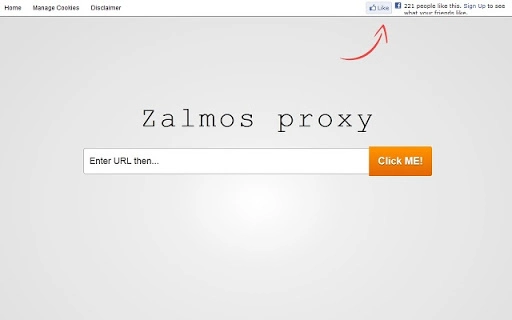
The software operates entirely through a web interface, requiring no installation or configuration of networking settings. Users simply enter a website URL into a form on the Zalmos proxy site, and the requested content is fetched and displayed through the proxy server. This makes it highly portable and accessible from any device with a modern web browser and internet connection.
Target users include individuals in regions with strict internet censorship, students or employees needing to access blocked educational or work-related content, and anyone concerned about online privacy. The tool is especially beneficial for quick, temporary access to content without leaving a trace on the local device.
Developed by Zalmos, the web proxy aims to provide a secure and straightforward method for anonymous browsing. While specific details about the company’s background were not provided, the tool’s focus on privacy and accessibility suggests a user-centric design philosophy.
Key Features & Capabilities
- Bypass Internet Restrictions – Users can access websites blocked by firewalls, ISPs, or network administrators by routing traffic through the proxy server. This is ideal for accessing content in censored regions or restricted environments.
- SSL Encryption for All Websites – Even if a visited site does not support HTTPS, the proxy adds an SSL layer, protecting sensitive data such as login credentials from being intercepted on insecure networks.
- Compatibility with Video Streaming Sites – Popular platforms like YouTube.com function properly through the proxy, enabling uninterrupted access to video content without requiring changes to browser settings.
- Anonymous Browsing – The user’s real IP address is hidden from the destination website, enhancing privacy and reducing tracking risks.
- Zero Installation Required – As a web-based tool, Zalmos Web Proxy does not require software installation or system modifications, making it instantly usable across multiple devices.
These features make the proxy suitable for temporary use cases such as accessing blocked social media, retrieving information from restricted databases, or viewing geo-restricted videos. The lack of software installation also reduces the risk of malware or unwanted system changes.
User Interface, Workflow & Performance
The user interface of Zalmos Web Proxy is minimal and straightforward, designed around a single input field where users enter the URL of the website they wish to visit. The clean layout prioritizes functionality over visual complexity, ensuring fast access with minimal distractions.
Navigating the tool is intuitive: users type a website address, submit the form, and the proxy retrieves and displays the content. There are no additional settings, menus, or configuration steps, which streamlines the workflow for casual users.
Performance is dependent on the proxy server’s load and internet connection speed. Since the tool relies on Zalmos’ infrastructure, actual response times and rendering quality may vary based on network conditions. The developer did not specify resource usage details, so performance on low-end devices remains uncertain.
Stability appears to be consistent with typical web-based tools, as the proxy operates within a browser environment. However, no information was provided about crash rates, session persistence, or long-term reliability. Users should expect standard browser behavior when interacting with proxy content.
Compatibility & System Requirements
Zalmos Web Proxy is compatible with Windows, Mac, and Linux operating systems, making it accessible across a wide range of desktop environments. The tool is designed to work with any modern web browser, including Chrome, Firefox, Safari, and Edge, ensuring broad usability.
As a web-based application, it does not require dedicated system resources or specific hardware configurations. The installation size is listed as 10 MB, though this likely refers to the proxy server’s footprint rather than a local installation, since no software is installed on the user’s device.
Exact system requirements were not listed. The developer did not provide information about minimum CPU, RAM, or storage needs. Compatibility with older browsers or legacy systems is not confirmed. Users should rely on standard browser compatibility for optimal results.
Pros and Cons
Pros
- Free to use with no hidden costs
- No software installation required
- Works across Windows, Mac, and Linux
- Effective for bypassing internet restrictions
- Provides SSL encryption for insecure websites
- Supports popular video streaming platforms
Cons
- Performance depends on proxy server load and internet speed
- No offline functionality
- Privacy is limited to the proxy server’s policies
- Not suitable for long-term or high-volume browsing
- Limited control over settings or customization
FAQ Section
Is Zalmos Web Proxy safe to use?
The proxy uses SSL encryption to secure data between the user and the proxy server. However, the privacy of browsing activity depends on the proxy provider’s policies, which were not disclosed. Users should avoid entering highly sensitive information.
Can I use Zalmos Web Proxy on my mobile device?
Yes, as long as the mobile device has a web browser and internet access, the proxy can be used. It is accessible through any browser, including those on smartphones and tablets.
Does Zalmos Web Proxy require a subscription or payment?
No, the software is free to use. There are no premium tiers or payment requirements mentioned in the available information.
How often does the proxy update its servers?
Specific update schedules were not provided. The developer did not disclose details about server maintenance or infrastructure updates.
Can I use Zalmos Web Proxy without an internet connection?
No, the tool requires an active internet connection to function. It operates entirely online and cannot be used offline.
Final Thoughts + CTA
Zalmos Web Proxy offers a simple, accessible solution for users needing to bypass internet restrictions and enhance online privacy. Its no-install, browser-based design makes it ideal for temporary, on-the-go use across multiple platforms. While it lacks advanced customization and long-term reliability, its core features—anonymous browsing, SSL encryption, and compatibility with major video sites—deliver tangible benefits for everyday users.
For individuals seeking a quick, secure way to access blocked content or protect sensitive data on public networks, Zalmos Web Proxy is a practical choice. It stands out as a lightweight, free tool that balances functionality with ease of use.
Download Zalmos Web Proxy now
Guides & Tutorials for Zalmos SSL Web Proxy for Free App for Chrome
How to install Zalmos SSL Web Proxy for Free App for Chrome
- Click the Preview / Download button above.
- Once redirected, accept the terms and click Install.
- Wait for the Zalmos SSL Web Proxy for Free App for Chrome download to finish on your device.
How to use Zalmos SSL Web Proxy for Free App for Chrome
This software is primarily used for its core features described above. Open the app after installation to explore its capabilities.
User Reviews for Zalmos SSL Web Proxy for Free App for Chrome 0
No reviews found





